
Support Information
An unfamiliar failure may not yet have a dedicated entry. Use General Support Situations to gather the information support needs.
The supplier says replies depend on the issue, its complexity and staff availability. There is no single response time for every error.
The supplier states that it restores lost subscription time and adds extra time for longer waits. It may offer a refund or a different product if a resolution takes too long. These are the supplier's stated arrangements; ask support how they apply to your order.
Staging Errors
Meaning: ISP Blocking, Firewall or Connection Issue.
Fixes to try
- Test a VPN connection using an exit region different from your current region.
- Turn the Windows Defender Firewall off completely for this connection test.
- Switch off the internet-protection feature provided by your ISP.
If the problem remains
- Open a ticket with your product provider.
- Attach an image of the full error message so support can inspect its details.
- Give support time to investigate; reply timing varies.
Meaning: Authentication Response Failure.
Fixes to try
- Use a valid license to obtain a fresh loader from the official loader website.
- Test the connection through a VPN.
If the problem remains
- Open a ticket with your product provider.
- Attach an image of the full error message so support can inspect its details.
- Give support time to investigate; reply timing varies.
Meaning: Authentication Response Failure.
Fixes to try
- Use a valid license to obtain a fresh loader from the official loader website.
If the problem remains
- Open a support ticket and include the complete error code.
Meaning: Resource Lookup Failure.
Fixes to try
- Install the Visual C++ redistributable.
- Install the DirectX runtime package.
- Bring Windows up to the latest release available for your installation.
If the problem remains
- Open a ticket with your product provider.
- Attach an image of the full error message so support can inspect its details.
- Give support time to investigate; reply timing varies.
Meaning: Module Allocation Failure.
Fixes to try
- Remove antivirus or system-monitoring software that interferes with the loader. The supplier includes Windows Defender in this check; follow the Windows preparation in your product's setup guide.
If the problem remains
- Open a support ticket and include the complete error code.
Meaning: Firewall or Connection Issue.
Fixes to try
- Test a VPN connection using an exit region different from your current region.
- Turn the Windows Defender Firewall off completely for this connection test.
If the problem remains
- Open a support ticket and include the complete error code.
Meaning: Authentication Response Failure.
Fixes to try
- Use a valid license to obtain a fresh loader from the official loader website.
- Test the connection through a VPN.
If the problem remains
- Open a support ticket and include the complete error code.
Meaning: Module Setup Failure.
Fixes to try
- Remove antivirus or system-monitoring software that interferes with the loader. The supplier includes Windows Defender in this check; follow the Windows preparation in your product's setup guide.
If the problem remains
- Open a support ticket and include the complete error code.
Bypass Failure
Meaning: Authentication Response Failure.
Fixes to try
- Check that the connection is stable and has sufficient speed.
- Test the connection through a VPN.
If the problem remains
- Send support the full code. A slow connection or a supplier service outage may also explain the failure.
Meaning: Authentication Response Failure (Contact support, no known fixes).
Meaning: Critical Bypass Failure.
Fixes to try
- Reboot the computer, then inject again.
If the problem remains
- Open a support ticket and include the complete error code.
Meaning: Critical Bypass Failure.
Fixes to try
- Remove antivirus or system-monitoring software that interferes with the loader. The supplier includes Windows Defender in this check; follow the Windows preparation in your product's setup guide.
If the problem remains
- Open a support ticket and include the complete error code.
Meaning: Critical Bypass Failure.
Fixes to try
- Remove antivirus or system-monitoring software that interferes with the loader. The supplier includes Windows Defender in this check; follow the Windows preparation in your product's setup guide.
If the problem remains
- Open a support ticket and include the complete error code.
Meaning: Critical Bypass Failure.
Fixes to try
- Remove antivirus or system-monitoring software that interferes with the loader. The supplier includes Windows Defender in this check; follow the Windows preparation in your product's setup guide.
If the problem remains
- Open a support ticket and include the complete error code.
Meaning: Critical Bypass Failure.
Fixes to try
- Remove antivirus or system-monitoring software that interferes with the loader. The supplier includes Windows Defender in this check; follow the Windows preparation in your product's setup guide.
If the problem remains
- Open a support ticket and include the complete error code.
Meaning: Critical Bypass Failure.
Fixes to try
- Remove antivirus or system-monitoring software that interferes with the loader. The supplier includes Windows Defender in this check; follow the Windows preparation in your product's setup guide.
If the problem remains
- Open a support ticket and include the complete error code.
Meaning: Driver Load Failure.
Fixes to try
- Remove FACEIT and other anti-cheat software that stays active in the background.
- Turn off Microsoft's vulnerable-driver blocklist. The supplier links this blocklist guide.
- Remove conflicting antivirus or system-monitoring tools. The supplier also links Defender Control.
If the problem remains
- Open a support ticket and include the complete error code.
- Wait for support to identify the blocker with you; response times vary.
Meaning: Driver Connection Failure.
Fixes to try
- Remove antivirus or system-monitoring software that interferes with the loader. The supplier includes Windows Defender in this check; follow the Windows preparation in your product's setup guide.
If the problem remains
- Open a support ticket and include the complete error code.
- Collect and attach
Loader.log. - Give support time to investigate; reply timing varies.
Meaning: Critical Bypass Failure.
Fixes to try
- Remove FACEIT and other anti-cheat software that stays active in the background.
- Remove antivirus or system-monitoring software that interferes with the loader. The supplier includes Windows Defender in this check; follow the Windows preparation in your product's setup guide.
If the problem remains
- Open a support ticket and include the complete error code.
- Collect and attach
Loader.log. - Give support time to investigate; reply timing varies.
Meaning: Critical Bypass Failure.
Fixes to try
- Remove FACEIT and other anti-cheat software that stays active in the background.
- Disable Kernel Verifier and completely remove the associated kernel-development tool.
- Remove antivirus or system-monitoring software that interferes with the loader. The supplier includes Windows Defender in this check; follow the Windows preparation in your product's setup guide.
If the problem remains
- Open a support ticket and include the complete error code.
- Collect and attach
Loader.log. - Give support time to investigate; reply timing varies.
Meaning: Critical Bypass Failure.
Fixes to try
- Remove FACEIT and other anti-cheat software that stays active in the background.
- Remove interfering antivirus and monitoring tools. The supplier specifically identifies Kaspersky Anti-Virus as a known cause of this error.
If the problem remains
- Open a support ticket and include the complete error code.
- Collect and attach
Loader.log. - Give support time to investigate; reply timing varies.
Meaning: Critical Bypass Failure.
Fixes to try
- Remove FACEIT and other anti-cheat software that stays active in the background.
- Remove interfering antivirus and monitoring tools. The supplier specifically identifies Kaspersky Anti-Virus as a known cause of this error.
If the problem remains
- Open a support ticket and include the complete error code.
- Collect and attach
Loader.log. - Give support time to investigate; reply timing varies.
Meaning: Critical Bypass Failure.
Fixes to try
- Remove antivirus or system-monitoring software that interferes with the loader. The supplier includes Windows Defender in this check; follow the Windows preparation in your product's setup guide.
If the problem remains
- Open a support ticket and include the complete error code.
- Collect and attach
Loader.log. - Give support time to investigate; reply timing varies.
Meaning: Critical Bypass Failure.
Fixes to try
- Close Steam fully, start it again, and only then retry injection.
- Remove antivirus or system-monitoring software that interferes with the loader. The supplier includes Windows Defender in this check; follow the Windows preparation in your product's setup guide.
If the problem remains
- Open a support ticket and include the complete error code.
- Collect and attach
Loader.log. - Give support time to investigate; reply timing varies.
Meaning: Critical Bypass Failure.
Fixes to try
- Remove antivirus or system-monitoring software that interferes with the loader. The supplier includes Windows Defender in this check; follow the Windows preparation in your product's setup guide.
If the problem remains
- Open a support ticket and include the complete error code.
- Collect and attach
Loader.log. - Give support time to investigate; reply timing varies.
Meaning: Critical Bypass Failure.
Fixes to try
- Remove antivirus or system-monitoring software that interferes with the loader. The supplier includes Windows Defender in this check; follow the Windows preparation in your product's setup guide.
If the problem remains
- Open a support ticket and include the complete error code.
- Collect and attach
Loader.log. - Give support time to investigate; reply timing varies.
Meaning: Critical Bypass Failure.
Fixes to try
- If the PC has multiple RAM modules, the supplier suggests testing with one module removed. Contact support if that is impractical for your setup.
- Remove antivirus or system-monitoring software that interferes with the loader. The supplier includes Windows Defender in this check; follow the Windows preparation in your product's setup guide.
If the problem remains
- Open a support ticket and include the complete error code.
- Collect and attach
Loader.log. - Give support time to investigate; reply timing varies.
Meaning: Exhausted System Resources.
Fixes to try
- Check that the PC has more than 8 GB of RAM.
- Remove antivirus or system-monitoring software that interferes with the loader. The supplier includes Windows Defender in this check; follow the Windows preparation in your product's setup guide.
Meaning: Exhausted System Resources.
Fixes to try
- Check that the PC has more than 8 GB of RAM.
- Remove antivirus or system-monitoring software that interferes with the loader. The supplier includes Windows Defender in this check; follow the Windows preparation in your product's setup guide.
Meaning: Critical Bypass Failure.
Fixes to try
- Remove antivirus or system-monitoring software that interferes with the loader. The supplier includes Windows Defender in this check; follow the Windows preparation in your product's setup guide.
If the problem remains
- Open a support ticket and include the complete error code.
- Collect and attach
Loader.log. - Give support time to investigate; reply timing varies.
Meaning: Exhausted System Resources.
Fixes to try
- Check that the PC has more than 8 GB of RAM.
- Remove antivirus or system-monitoring software that interferes with the loader. The supplier includes Windows Defender in this check; follow the Windows preparation in your product's setup guide.
Meaning: Exhausted System Resources.
Fixes to try
- Check that the PC has more than 8 GB of RAM.
- Remove antivirus or system-monitoring software that interferes with the loader. The supplier includes Windows Defender in this check; follow the Windows preparation in your product's setup guide.
Meaning: Critical Bypass Failure.
Fixes to try
- Turn off Virtualization-Based Security (VBS).
- Remove antivirus or system-monitoring software that interferes with the loader. The supplier includes Windows Defender in this check; follow the Windows preparation in your product's setup guide.
If the problem remains
- Open a support ticket and include the complete error code.
- Collect and attach
Loader.log. - Give support time to investigate; reply timing varies.
Meaning: Critical Bypass Failure.
Fixes to try
- Turn off Virtualization-Based Security (VBS).
- Remove antivirus or system-monitoring software that interferes with the loader. The supplier includes Windows Defender in this check; follow the Windows preparation in your product's setup guide.
If the problem remains
- Open a support ticket and include the complete error code.
- Collect and attach
Loader.log. - Give support time to investigate; reply timing varies.
Meaning: Critical Bypass Failure.
Fixes to try
- Remove antivirus or system-monitoring software that interferes with the loader. The supplier includes Windows Defender in this check; follow the Windows preparation in your product's setup guide.
If the problem remains
- Open a support ticket and include the complete error code.
- Collect and attach
Loader.log. - Give support time to investigate; reply timing varies.
Meaning: Resource Lookup Failure.
Fixes to try
- Roll back to a supported Windows version: the supplier identifies the current version as unsupported. Its reference estimates 24–48 hours after the requested files are submitted to add version support.
If the problem remains
- Open a support ticket and include the complete error code.
- Collect and attach
Loader.log. - Collect the system file
ntoskrnl.exe. - Support may need to add compatibility for this Windows version; see response times.
Meaning: Critical Bypass Failure.
Fixes to try
- Remove antivirus or system-monitoring software that interferes with the loader. The supplier includes Windows Defender in this check; follow the Windows preparation in your product's setup guide.
- Consider rolling back to a supported Windows version because the installed build may be unsupported. The supplier estimates 24–48 hours after file submission to add support.
If the problem remains
- Open a support ticket and include the complete error code.
- Collect and attach
Loader.log. - Collect the system file
ntoskrnl.exe. - Support may need to add compatibility for this Windows version; see response times.
Meaning: Critical Bypass Failure.
Fixes to try
- Turn off Virtualization-Based Security (VBS).
- Remove antivirus or system-monitoring software that interferes with the loader. The supplier includes Windows Defender in this check; follow the Windows preparation in your product's setup guide.
- Consider rolling back to a supported Windows version because the installed build may be unsupported. The supplier estimates 24–48 hours after file submission to add support.
If the problem remains
- Open a support ticket and include the complete error code.
- Collect and attach
Loader.log. - Collect the system file
ntoskrnl.exe. - Support may need to add compatibility for this Windows version; see response times.
Meaning: Critical Bypass Failure.
Fixes to try
- Consider rolling back to a supported Windows version because the installed build may be unsupported. The supplier estimates 24–48 hours after file submission to add support.
If the problem remains
- Open a support ticket and include the complete error code.
- Collect and attach
Loader.log. - Collect the system file
ntoskrnl.exe. - Support may need to add compatibility for this Windows version; see response times.
Meaning: Critical Bypass Failure.
Fixes to try
- Turn off Virtualization-Based Security (VBS).
- Remove antivirus or system-monitoring software that interferes with the loader. The supplier includes Windows Defender in this check; follow the Windows preparation in your product's setup guide.
If the problem remains
- Open a support ticket and include the complete error code.
- Collect and attach
Loader.log. - Give support time to investigate; reply timing varies.
Meaning: Critical Bypass Failure.
Fixes to try
- Turn off Virtualization-Based Security (VBS).
- Remove antivirus or system-monitoring software that interferes with the loader. The supplier includes Windows Defender in this check; follow the Windows preparation in your product's setup guide.
If the problem remains
- Open a support ticket and include the complete error code.
- Collect and attach
Loader.log. - Give support time to investigate; reply timing varies.
Meaning: Critical Bypass Failure.
Fixes to try
- Turn off Virtualization-Based Security (VBS).
- Remove antivirus or system-monitoring software that interferes with the loader. The supplier includes Windows Defender in this check; follow the Windows preparation in your product's setup guide.
If the problem remains
- Open a support ticket and include the complete error code.
- Collect and attach
Loader.log. - Give support time to investigate; reply timing varies.
Meaning: Critical Bypass Failure.
Fixes to try
- Roll back to a supported Windows version: the supplier identifies the current version as unsupported. Its reference estimates 24–48 hours after the requested files are submitted to add version support.
If the problem remains
- Open a support ticket and include the complete error code.
- Collect and attach
Loader.log. - Collect
wdfilter.sysfromSystem32\Drivers\. - Support may need to add compatibility for this Windows version; see response times.
Meaning: Critical Bypass Failure.
Fixes to try
- Start with a fresh PC restart and retry injection.
- Turn off Virtualization-Based Security (VBS).
- Remove antivirus or system-monitoring software that interferes with the loader. The supplier includes Windows Defender in this check; follow the Windows preparation in your product's setup guide.
- Consider rolling back to a supported Windows version because the installed build may be unsupported. The supplier estimates 24–48 hours after file submission to add support.
If the problem remains
- Open a support ticket and include the complete error code.
- Collect and attach
Loader.log. - Collect
wdfilter.sysfromSystem32\Drivers\. - Support may need to add compatibility for this Windows version; see response times.
Meaning: Critical Bypass Failure.
Fixes to try
- Turn off Virtualization-Based Security (VBS).
- Remove antivirus or system-monitoring software that interferes with the loader. The supplier includes Windows Defender in this check; follow the Windows preparation in your product's setup guide.
If the problem remains
- Open a support ticket and include the complete error code.
- Collect and attach
Loader.log. - Give support time to investigate; reply timing varies.
Meaning: Critical Bypass Failure.
Fixes to try
- Roll back to a supported Windows version: the supplier identifies the current version as unsupported. Its reference estimates 24–48 hours after the requested files are submitted to add version support.
If the problem remains
- Open a support ticket and include the complete error code.
- Collect and attach
Loader.log. - Collect the system file
ci.dll. - Support may need to add compatibility for this Windows version; see response times.
Meaning: Critical Bypass Failure.
Fixes to try
- Start with a fresh PC restart and retry injection.
- Turn off Virtualization-Based Security (VBS).
- Remove antivirus or system-monitoring software that interferes with the loader. The supplier includes Windows Defender in this check; follow the Windows preparation in your product's setup guide.
- Consider rolling back to a supported Windows version because the installed build may be unsupported. The supplier estimates 24–48 hours after file submission to add support.
If the problem remains
- Open a support ticket and include the complete error code.
- Collect and attach
Loader.log. - Collect the system file
ci.dll. - Support may need to add compatibility for this Windows version; see response times.
Meaning: Critical Bypass Failure.
Fixes to try
- Turn off Virtualization-Based Security (VBS).
- Remove antivirus or system-monitoring software that interferes with the loader. The supplier includes Windows Defender in this check; follow the Windows preparation in your product's setup guide.
If the problem remains
- Open a support ticket and include the complete error code.
- Collect and attach
Loader.log. - Give support time to investigate; reply timing varies.
Meaning: Critical Bypass Failure.
Fixes to try
- Roll back to a supported Windows version: the supplier identifies the current version as unsupported. Its reference estimates 24–48 hours after the requested files are submitted to add version support.
If the problem remains
- Open a support ticket and include the complete error code.
- Collect and attach
Loader.log. - Collect the system file
ntoskrnl.exe. - Support may need to add compatibility for this Windows version; see response times.
Meaning: Critical Bypass Failure.
Fixes to try
- Start with a fresh PC restart and retry injection.
- Turn off Virtualization-Based Security (VBS).
- Remove antivirus or system-monitoring software that interferes with the loader. The supplier includes Windows Defender in this check; follow the Windows preparation in your product's setup guide.
- Consider rolling back to a supported Windows version because the installed build may be unsupported. The supplier estimates 24–48 hours after file submission to add support.
If the problem remains
- Open a support ticket and include the complete error code.
- Collect and attach
Loader.log. - Collect the system file
ntoskrnl.exe. - Support may need to add compatibility for this Windows version; see response times.
Meaning: Critical Bypass Failure.
Fixes to try
- Start with a fresh PC restart and retry injection.
- Turn off Virtualization-Based Security (VBS).
- Remove antivirus or system-monitoring software that interferes with the loader. The supplier includes Windows Defender in this check; follow the Windows preparation in your product's setup guide.
- Consider rolling back to a supported Windows version because the installed build may be unsupported. The supplier estimates 24–48 hours after file submission to add support.
If the problem remains
- Open a support ticket and include the complete error code.
- Collect and attach
Loader.log. - Give support time to investigate; reply timing varies.
Meaning: Critical Bypass Failure.
Fixes to try
- Start with a fresh PC restart and retry injection.
- Turn off Virtualization-Based Security (VBS).
- Remove antivirus or system-monitoring software that interferes with the loader. The supplier includes Windows Defender in this check; follow the Windows preparation in your product's setup guide.
- Consider rolling back to a supported Windows version because the installed build may be unsupported. The supplier estimates 24–48 hours after file submission to add support.
If the problem remains
- Open a support ticket and include the complete error code.
- Collect and attach
Loader.log. - Send a screenshot of the
winverdialog. - Support may need to add compatibility for this Windows version; see response times.
Meaning: Critical Bypass Failure.
Fixes to try
- Start with a fresh PC restart and retry injection.
- Turn off Virtualization-Based Security (VBS).
- Remove antivirus or system-monitoring software that interferes with the loader. The supplier includes Windows Defender in this check; follow the Windows preparation in your product's setup guide.
- Consider rolling back to a supported Windows version because the installed build may be unsupported. The supplier estimates 24–48 hours after file submission to add support.
If the problem remains
- Open a support ticket and include the complete error code.
- Collect and attach
Loader.log. - Send a screenshot of the
winverdialog. - Support may need to add compatibility for this Windows version; see response times.
Meaning: Critical Bypass Failure.
Fixes to try
- Start with a fresh PC restart and retry injection.
- Turn off Virtualization-Based Security (VBS).
- Remove antivirus or system-monitoring software that interferes with the loader. The supplier includes Windows Defender in this check; follow the Windows preparation in your product's setup guide.
- Consider rolling back to a supported Windows version because the installed build may be unsupported. The supplier estimates 24–48 hours after file submission to add support.
If the problem remains
- Open a support ticket and include the complete error code.
- Collect and attach
Loader.log. - Send a screenshot of the
winverdialog. - Support may need to add compatibility for this Windows version; see response times.
Meaning: Critical Bypass Failure.
Fixes to try
- Start with a fresh PC restart and retry injection.
- Turn off Virtualization-Based Security (VBS).
- Remove antivirus or system-monitoring software that interferes with the loader. The supplier includes Windows Defender in this check; follow the Windows preparation in your product's setup guide.
- Consider rolling back to a supported Windows version because the installed build may be unsupported. The supplier estimates 24–48 hours after file submission to add support.
If the problem remains
- Open a support ticket and include the complete error code.
- Collect and attach
Loader.log. - Send a screenshot of the
winverdialog. - Support may need to add compatibility for this Windows version; see response times.
Injection Failure
Meaning: Authentication Response Failure.
Fixes to try
- Check that the connection is stable and has sufficient speed.
- Test the connection through a VPN.
If the problem remains
- Send support the full code. A slow connection or a supplier service outage may also explain the failure.
Meaning: Authentication Response Failure (Contact support, no known fixes).
Meaning: Authentication Response Failure (Contact support, no known fixes).
Meaning: Module Write Failure.
Fixes to try
- Reboot the computer, then inject again.
- Remove antivirus or system-monitoring software that interferes with the loader. The supplier includes Windows Defender in this check; follow the Windows preparation in your product's setup guide.
If the problem remains
- Open a support ticket and include the complete error code.
- Include the username used to sign in to the loader.
- Give support time to investigate; reply timing varies.
Meaning: Module Write Failure.
Fixes to try
- Reboot the computer, then inject again.
- Remove antivirus or system-monitoring software that interferes with the loader. The supplier includes Windows Defender in this check; follow the Windows preparation in your product's setup guide.
If the problem remains
- Open a support ticket and include the complete error code.
- Collect and attach
Loader.log. - Give support time to investigate; reply timing varies.
Meaning: Client Connection Failure.
Fixes to try
- Make sure the Rust configuration is writable rather than read-only or locked.
- Remove Rust, download a fresh copy and install it again, then retry injection.
- Configure Steam to start with administrator privileges; the supplier provides this Steam administrator guide.
- Remove antivirus or system-monitoring software that interferes with the loader. The supplier includes Windows Defender in this check; follow the Windows preparation in your product's setup guide.
If the problem remains
- Open a support ticket and include the complete error code.
- Collect both
Loader.logandInternal.log. - Give support time to investigate; reply timing varies.
Meaning: Authentication Response Failure.
Fixes to try
- Check that the connection is stable and has sufficient speed.
- Test the connection through a VPN.
If the problem remains
- Send support the full code. A slow connection or a supplier service outage may also explain the failure.
Meaning: Client Communication Failure.
Fixes to try
- Remove Rust, download a fresh copy and install it again, then retry injection.
- Remove antivirus or system-monitoring software that interferes with the loader. The supplier includes Windows Defender in this check; follow the Windows preparation in your product's setup guide.
If the problem remains
- Open a support ticket and include the complete error code.
- Collect both
Loader.logandInternal.log. - Give support time to investigate; reply timing varies.
Meaning: Client Mapping Failure.
Fixes to try
- Install the Visual C++ redistributable.
- Install the DirectX runtime package.
- Bring Windows up to the latest release available for your installation.
- Remove antivirus or system-monitoring software that interferes with the loader. The supplier includes Windows Defender in this check; follow the Windows preparation in your product's setup guide.
If the problem remains
- Open a support ticket and include the complete error code.
- Collect both
Loader.logandInternal.log. - Give support time to investigate; reply timing varies.
Meaning: Client Mapping Failure.
Fixes to try
- Install the Visual C++ redistributable.
- Install the DirectX runtime package.
- Bring Windows up to the latest release available for your installation.
- Remove antivirus or system-monitoring software that interferes with the loader. The supplier includes Windows Defender in this check; follow the Windows preparation in your product's setup guide.
If the problem remains
- Open a support ticket and include the complete error code.
- Collect both
Loader.logandInternal.log. - Give support time to investigate; reply timing varies.
Meaning: Client Mapping Failure.
Fixes to try
- Install the Visual C++ redistributable.
- Install the DirectX runtime package.
- Bring Windows up to the latest release available for your installation.
- Remove antivirus or system-monitoring software that interferes with the loader. The supplier includes Windows Defender in this check; follow the Windows preparation in your product's setup guide.
If the problem remains
- Open a support ticket and include the complete error code.
- Collect both
Loader.logandInternal.log. - Give support time to investigate; reply timing varies.
Meaning: Client Mapping Failure.
Fixes to try
- Remove Rust, download a fresh copy and install it again, then retry injection.
- Remove antivirus or system-monitoring software that interferes with the loader. The supplier includes Windows Defender in this check; follow the Windows preparation in your product's setup guide.
If the problem remains
- Open a support ticket and include the complete error code.
- Collect both
Loader.logandInternal.log. - Give support time to investigate; reply timing varies.
Meaning: Client Communication Failure.
Fixes to try
- Remove Rust, download a fresh copy and install it again, then retry injection.
- Remove antivirus or system-monitoring software that interferes with the loader. The supplier includes Windows Defender in this check; follow the Windows preparation in your product's setup guide.
If the problem remains
- Open a support ticket and include the complete error code.
- Collect both
Loader.logandInternal.log. - Give support time to investigate; reply timing varies.
Internal Errors
Meaning: Server Connection Failure.
Fixes to try
- Test a VPN connection using an exit region different from your current region.
- Turn the Windows Defender Firewall off completely for this connection test.
- Switch off the internet-protection feature provided by your ISP.
If the problem remains
- Open a ticket with your product provider.
- Attach an image of the full error message so support can inspect its details.
- Give support time to investigate; reply timing varies.
Meaning: Server Connection Failure.
Fixes to try
- Test a VPN connection using an exit region different from your current region.
- Turn the Windows Defender Firewall off completely for this connection test.
- Switch off the internet-protection feature provided by your ISP.
If the problem remains
- Open a ticket with your product provider.
- Attach an image of the full error message so support can inspect its details.
- Give support time to investigate; reply timing varies.
Meaning: Server Connection Issue.
Fixes to try
- Remove Rust, download a fresh copy and install it again, then retry injection.
If the problem remains
- Open a support ticket describing what happens.
- Collect both
Loader.logandInternal.log. - Give support time to investigate; reply timing varies.
Meaning: Server Connection Issue.
Fixes to try
- Verify Rust's installed files.
- Check the Rust installation branch.
- Remove and reinstall Rust.
- A game/product update may be needed. The supplier says affected subscription time is credited automatically when it updates the product, without requiring a ticket for that compensation.
If the problem remains
- Open a support ticket describing what happens.
- Collect both
Loader.logandInternal.log. - Give support time to investigate; reply timing varies.
Meaning: Exhausted System Resources.
Fixes to try
- Increase the Windows paging file.
- Remove Rust, download a fresh copy and install it again, then retry injection.
- If this PC is not already on Windows 11, the supplier suggests testing Windows 11.
If the problem remains
- Open a support ticket describing what happens.
- Collect
Internal.log. - Give support time to investigate; reply timing varies.
External Errors
Meaning: Cheat Load Failure.
Fixes to try
- Verify Rust's installed files.
- Check the Rust installation branch.
- Remove and reinstall Rust.
- Remove antivirus or system-monitoring software that interferes with the loader. The supplier includes Windows Defender in this check; follow the Windows preparation in your product's setup guide.
If the problem remains
- Open a support ticket describing what happens.
- Collect both
Loader.logandRust.log. - Give support time to investigate; reply timing varies.
Meaning: Menu Input Failure.
Fixes to try
- Verify Rust's installed files.
- Check the Rust installation branch.
- Remove and reinstall Rust.
- A game/product update may be needed. The supplier says affected subscription time is credited automatically when it updates the product, without requiring a ticket for that compensation.
If the problem remains
- Open a support ticket describing what happens.
- Collect both
Loader.logandRust.log. - Give support time to investigate; reply timing varies.
Fixes to try
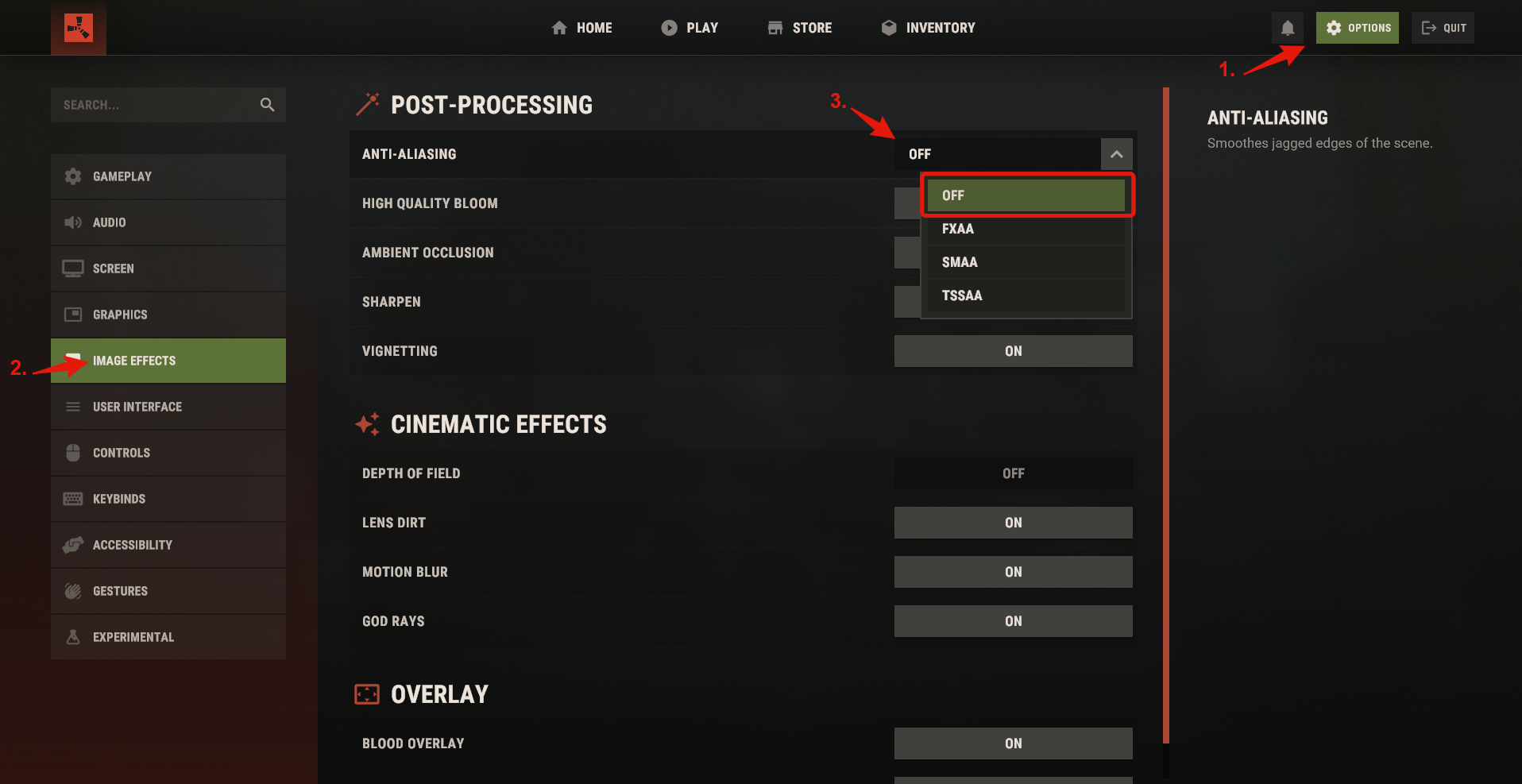
- Set Rust's Anti-Aliasing option to Off, as illustrated below.
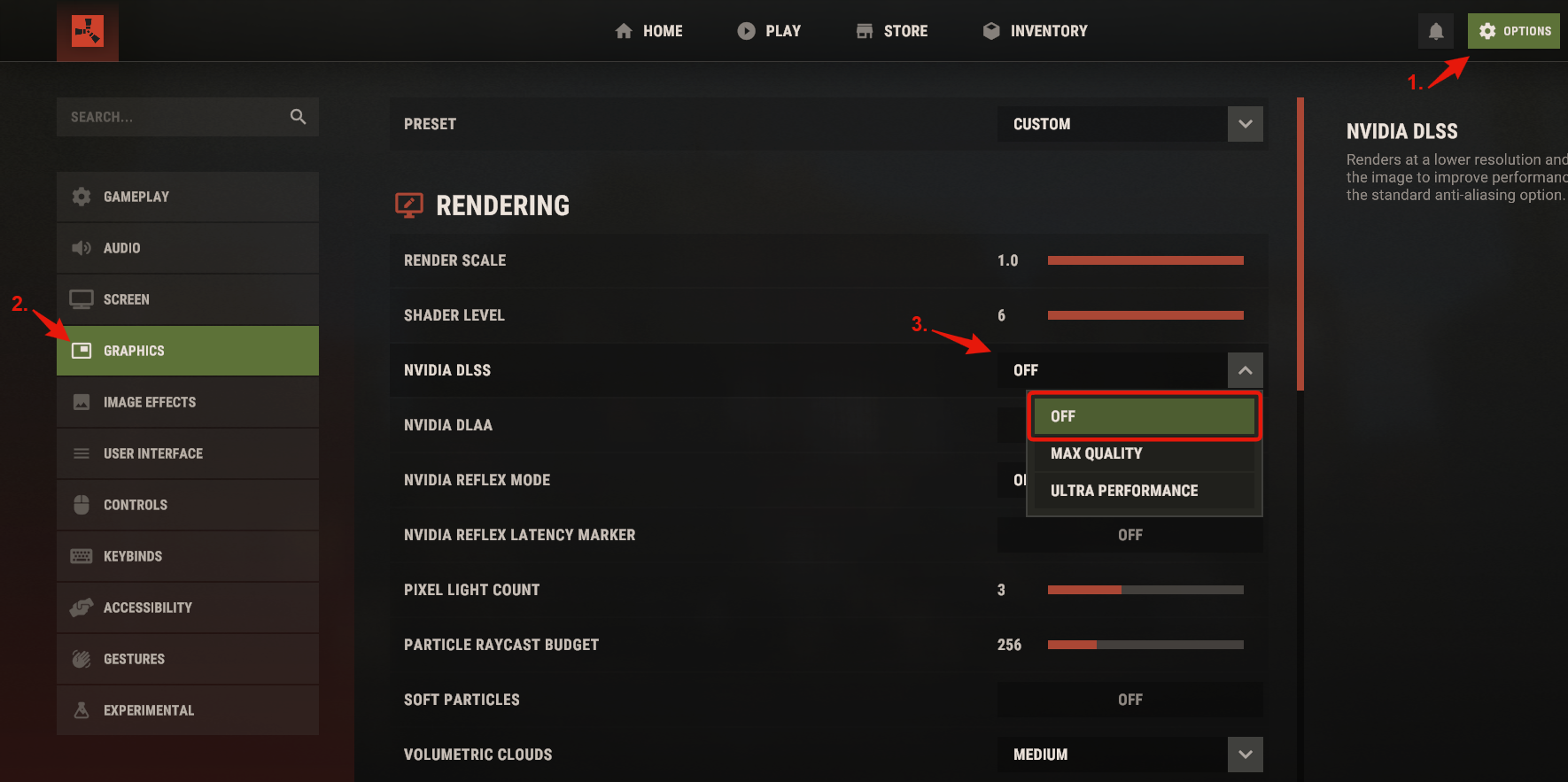
- Set NVIDIA DLSS to Off in Rust, using the screenshot below as a reference.
If the problem remains
- Open a support ticket describing what happens.
- Give support time to investigate; reply timing varies.
Meaning: Critical Module Failure.
Fixes to try
- Try a small number of fresh injections and restart the PC before another attempt.
- Remove antivirus or system-monitoring software that interferes with the loader. The supplier includes Windows Defender in this check; follow the Windows preparation in your product's setup guide.
If the problem remains
- Open a support ticket and include the complete error code.
- Collect both
Loader.logandRust.log. - Give support time to investigate; reply timing varies.
Meaning: Exhausted System Resources.
Fixes to try
- Apply an FPS limit in Rust so that the CPU has resources available for the overlay.
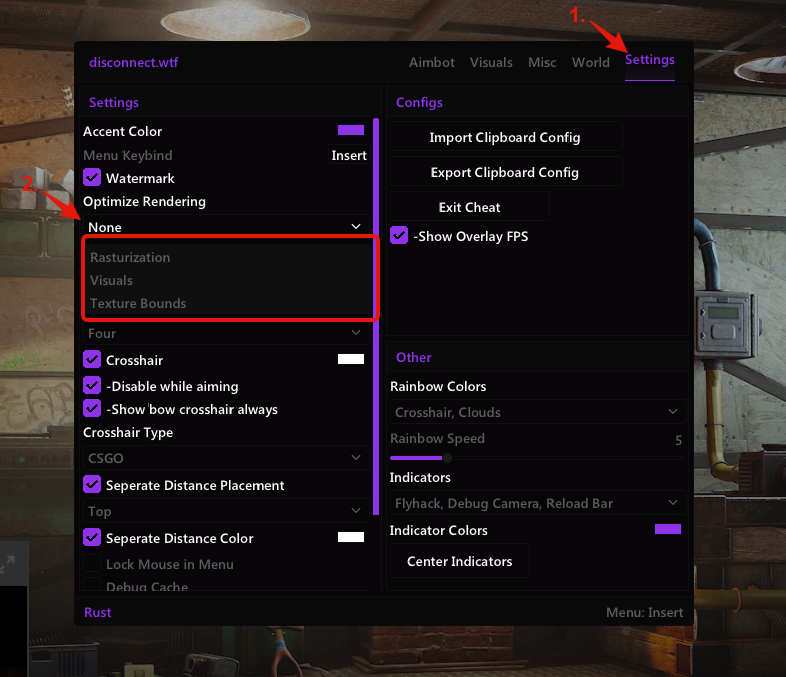
- Review Settings → Optimize Rendering in the cheat. The screenshot shows the Rasterization, Visuals and Texture Bounds options used to reduce rendering work.
If the problem remains
- Open a support ticket describing what happens.
- Give support time to investigate; reply timing varies.
General Fixes
Meaning: Authentication Verification Failure.
Fixes to try
- Keep only one loader instance open. Authentication permits one active session at a time.
If the problem remains
- Send support the full code. A slow connection or a supplier service outage may also explain the failure.
Meaning: Authentication Password Verification Failure.
Fixes to try
- Check the password carefully, including every letter and number, and try the other passwords you may have used.
- If the correct password cannot be recovered, open a support ticket and ask for a loader password reset.
Meaning: Invalid Device Identifiers.
Fixes to try
- Ask support to reset the HWID. Identify the account using your loader username or one of the licenses you purchased.
Support Guides
Steps
- Start the loader and sign in to your account.
- Open Settings before choosing a product.
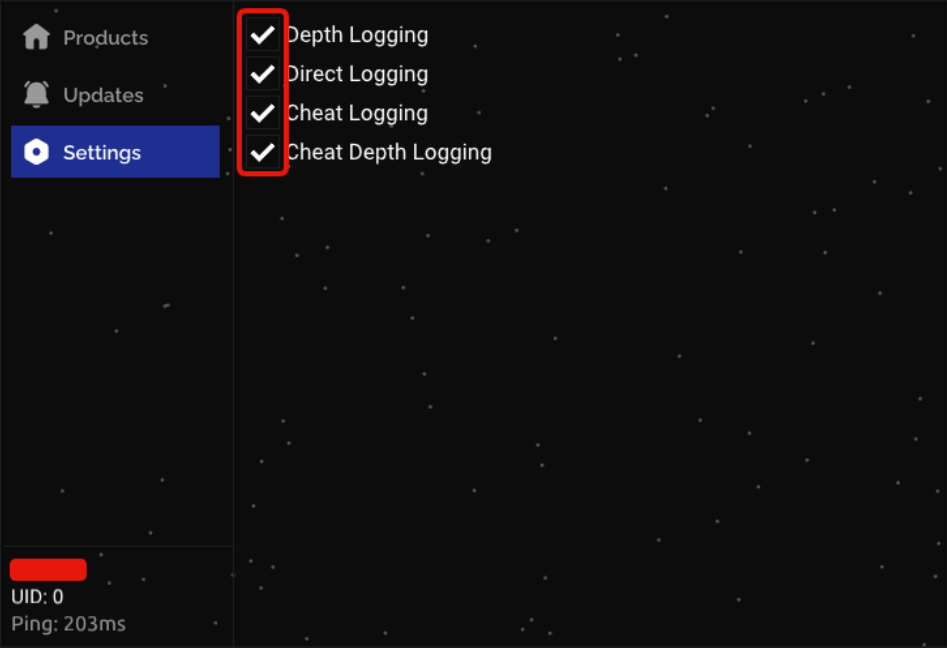
- Enable Depth Logging, Direct Logging, Cheat Logging and Cheat Depth Logging, as pictured, unless support or the relevant error entry asks for a different sequence.
- Inject the affected product and reproduce the error. After it occurs, allow 30–60 seconds for log data to be written.
- In File Explorer, open
C:\Users\Public\.
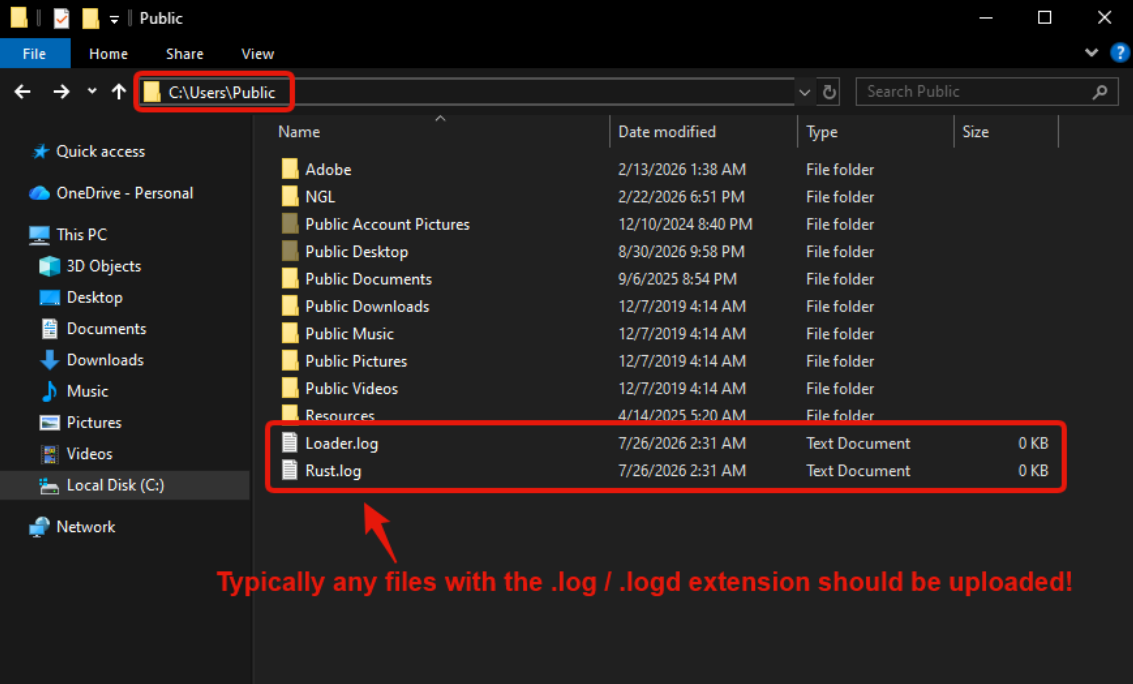
- Send support the requested logs. Common names are
Loader.log,Rust.logandInternal.log; if no particular file was requested, include every.logand.logdfile from that folder.
Steps
- Open
C:\Windows\System32in File Explorer.
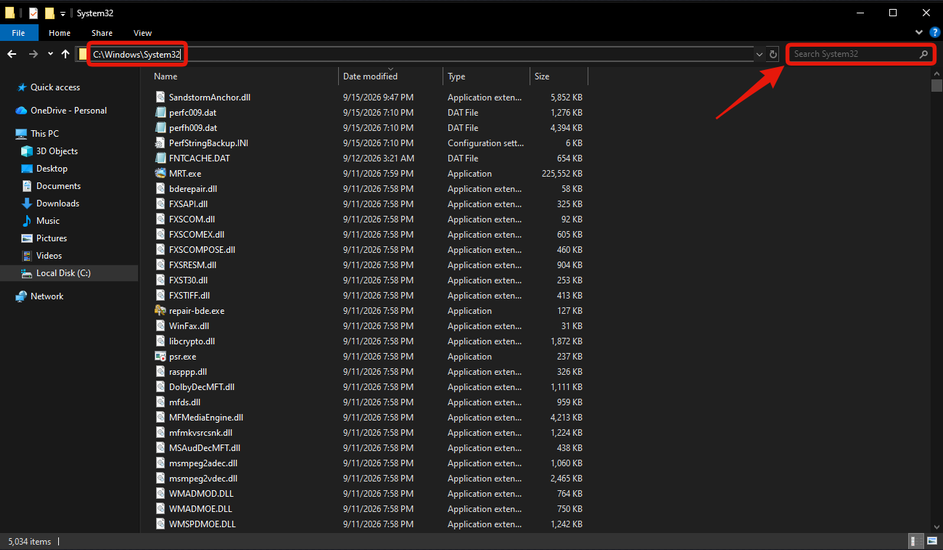
- Search that location for the exact system filename requested by the error entry or support, such as
ntoskrnl.exeorwin32k.sys. - Compare the result with the requested filename and select the exact matching file, as illustrated.
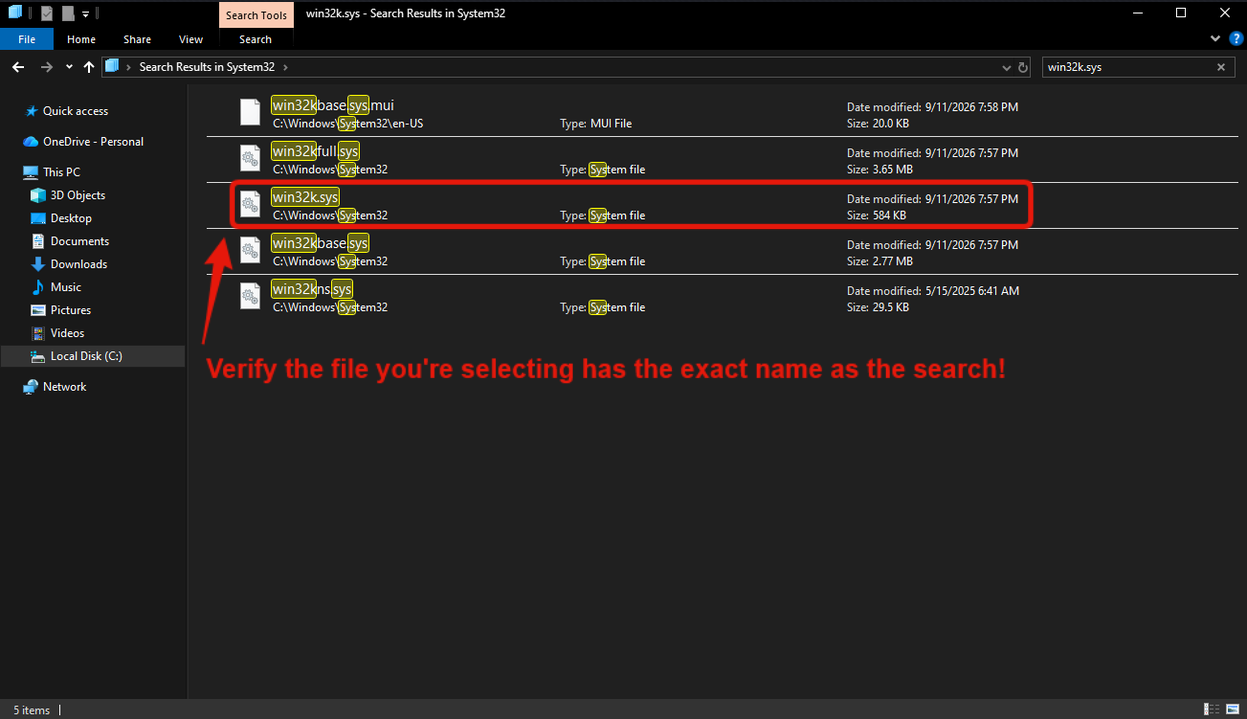
- Right-click that file, copy it and paste a copy onto the Desktop. Copying first avoids the restriction on dragging directly from the system folder.
- Attach the requested copies to the support conversation.
Steps
- Open
C:\Windows\Minidump. If the folder is absent, tell the support person handling the issue.
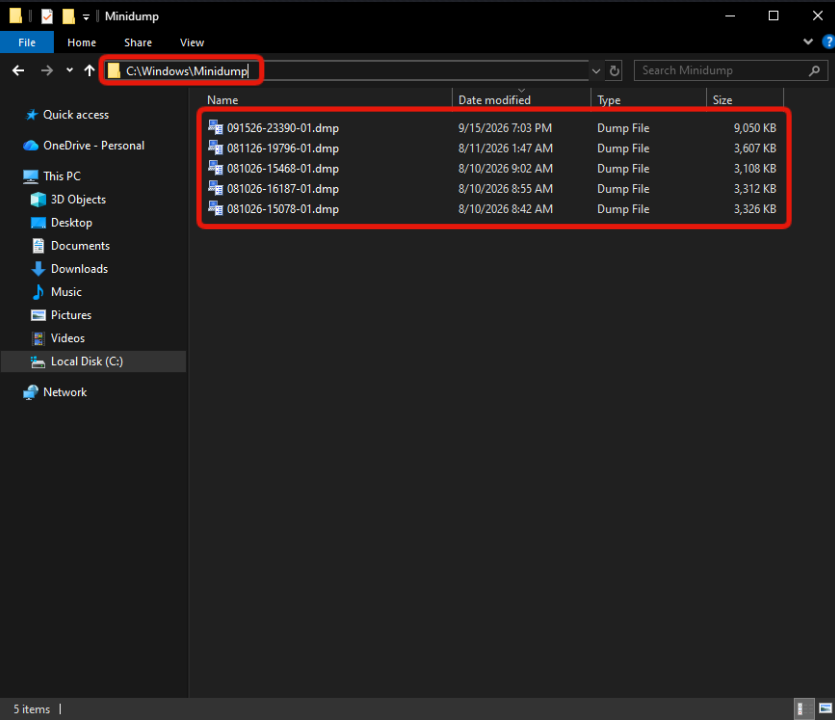
- Sort by Date modified in descending order, with the arrow pointing downward.
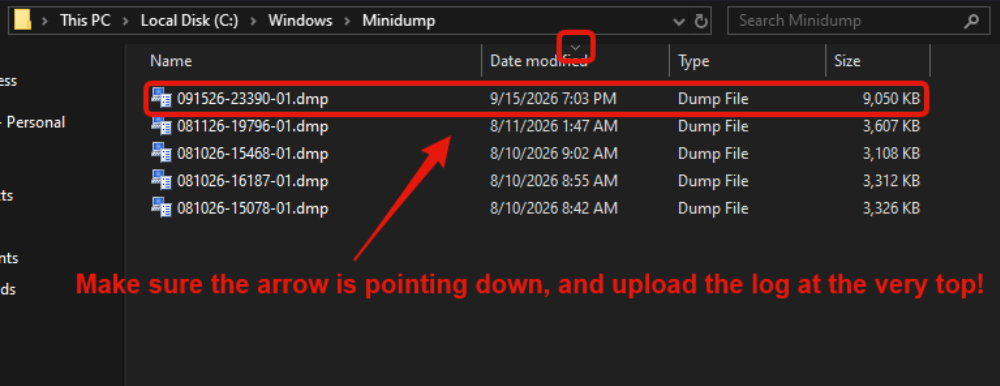
- Copy the first, newest file at the top of the list onto the Desktop using the right-click menu; do not drag it directly from the system directory.
- Attach the requested copies to the support conversation.
Steps
- Search Windows for
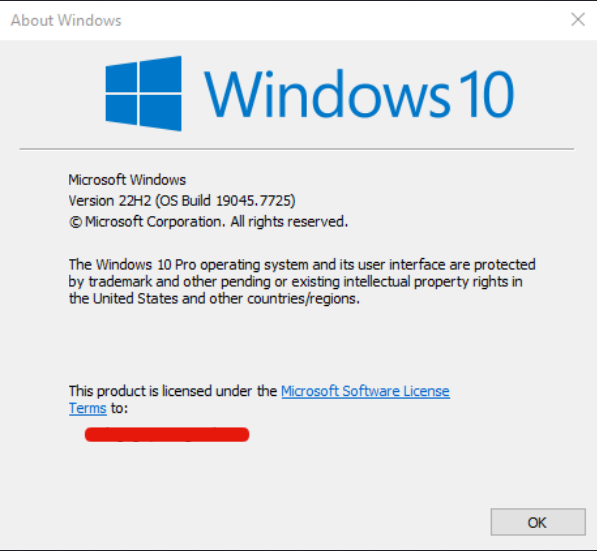
winverand press Enter. - Send support a screenshot of the Windows-version dialog. The image below is an example, not a required version number.
Steps
- Make at least 64 GB of free space available on the Windows system drive.
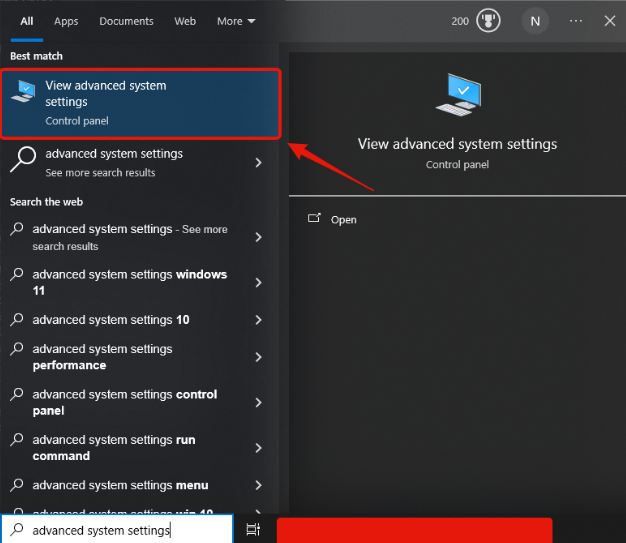
- Search Windows for advanced system settings and open View advanced system settings.
- In System Properties → Advanced, choose Settings under Performance. Open Advanced → Virtual memory → Change, following the numbered screenshot.
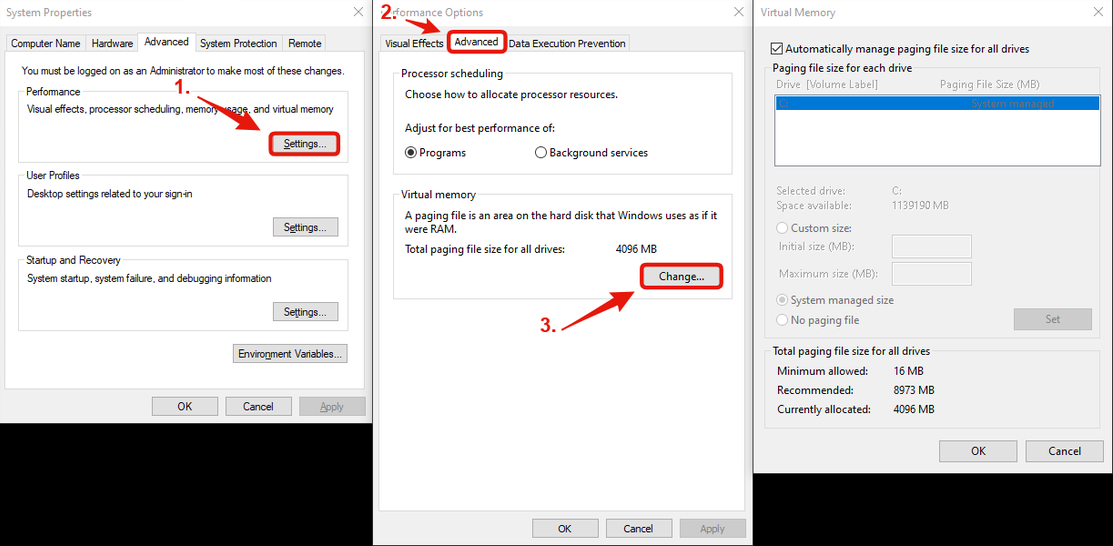
- In Virtual Memory, clear Automatically manage paging file size for all drives, choose the Windows drive and select Custom size. The supplier's example uses Initial size: 4096 MB and Maximum size: 65536 MB.
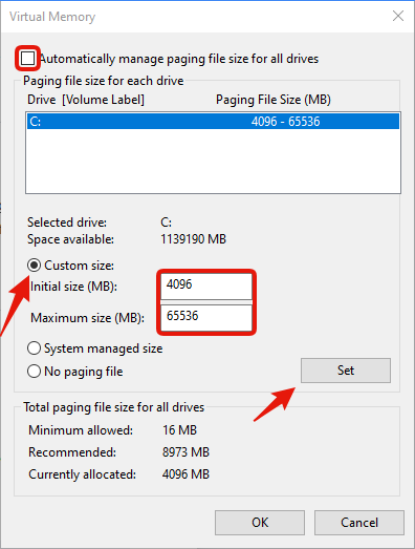
- After entering those values, select Set.
- Confirm each dialog with OK, then restart Windows.
Steps
- Try a small number of fresh injections and restart the PC before another attempt.
- Check for antivirus, anti-cheat and other applications that may interfere with injection.
- Open a support ticket and include the complete error code.
- Collect the relevant loader and cheat logs.
- Allow the support team to investigate; see response times.
Rust Support Guides
Steps
- In Steam's Library, open Rust's Properties from its settings menu, as pictured.
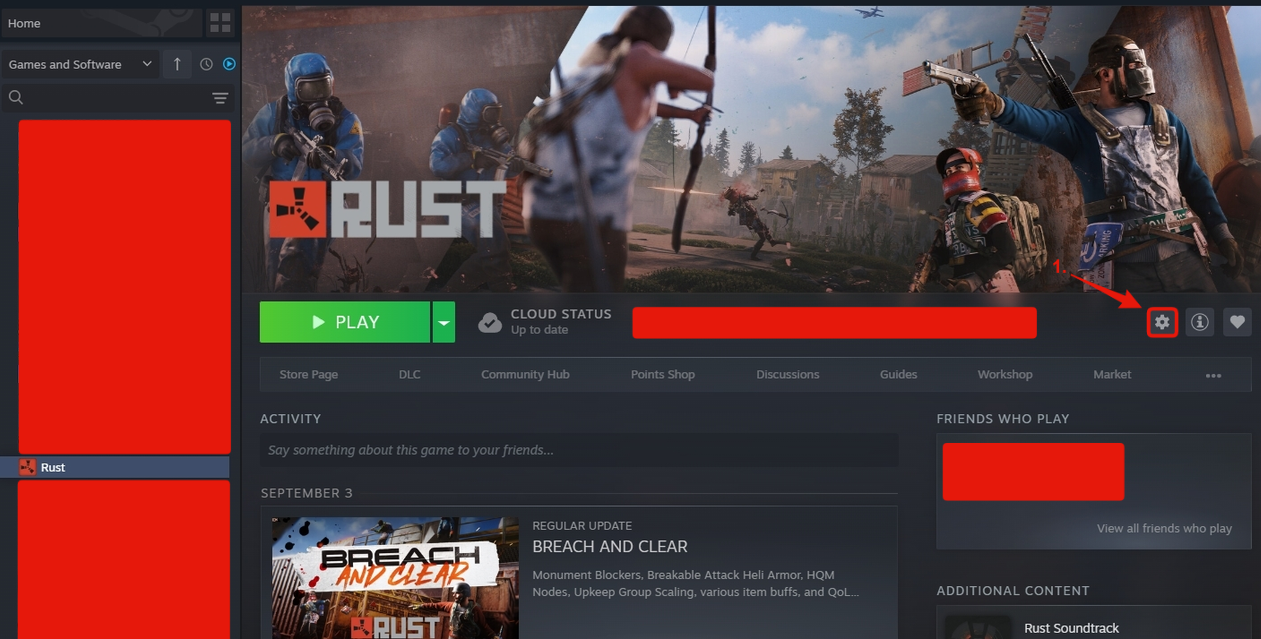
- Open Installed Files and select Verify integrity of game files.
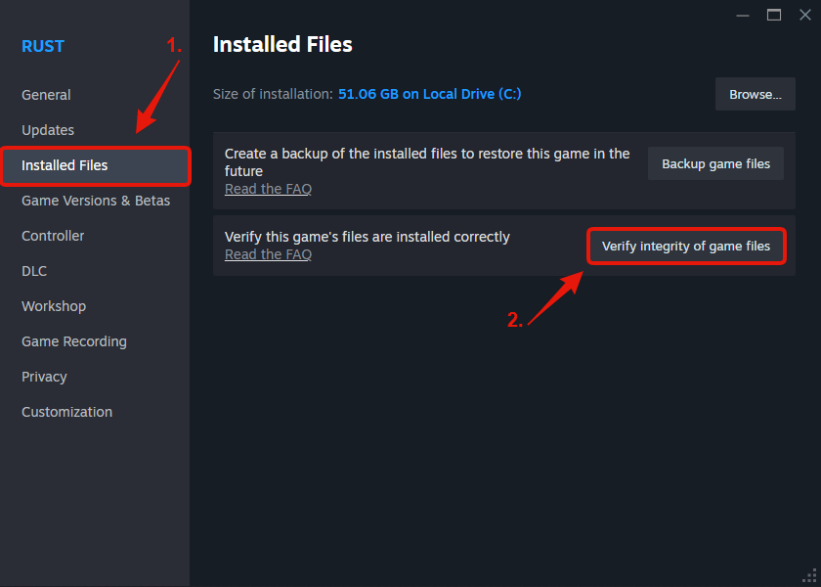
- Let verification reach 100% before testing the product again.
Steps
- In Steam's Library, open Rust's Properties from its settings menu, as pictured.
- Open Game Versions & Betas and choose Default, shown as Default Public Version in the screenshot.
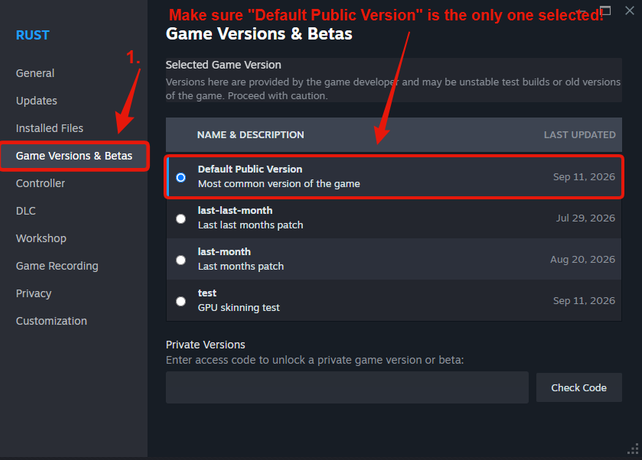
- Allow Steam to install that branch, then retry.
Steps
- In Rust's Steam menu, choose Manage → Uninstall, as illustrated.
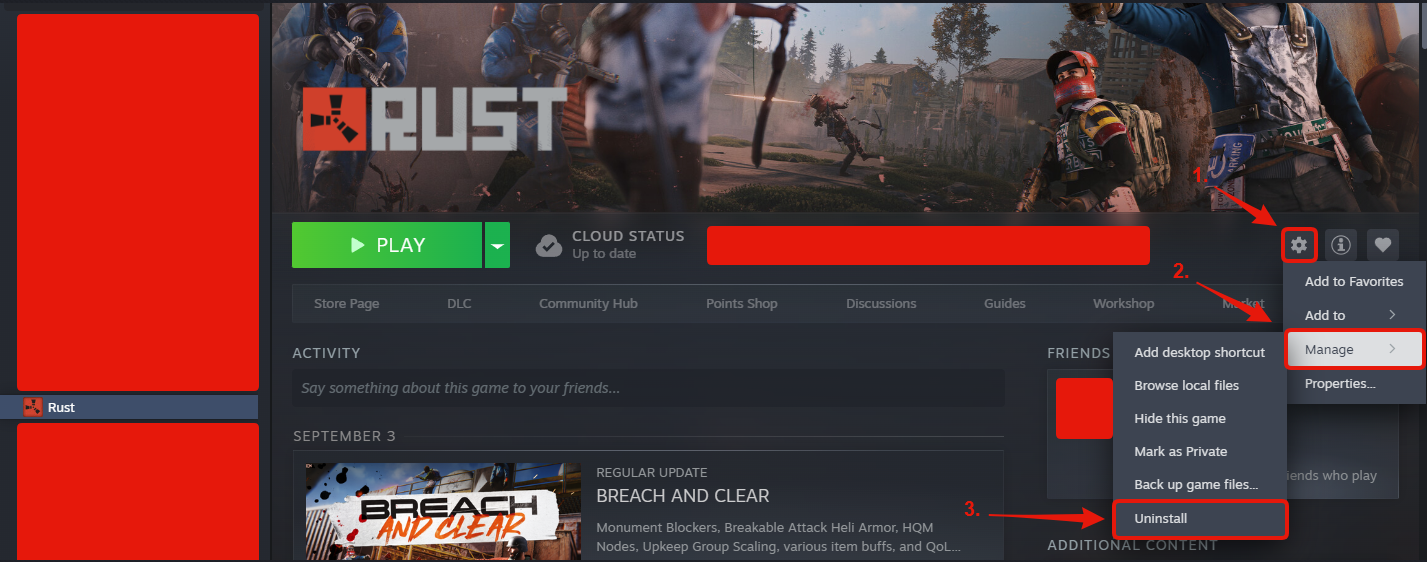
- Install Rust again through Steam and retry once installation finishes.
Discord Support Guides
Steps
- Use the official desktop application from Discord.
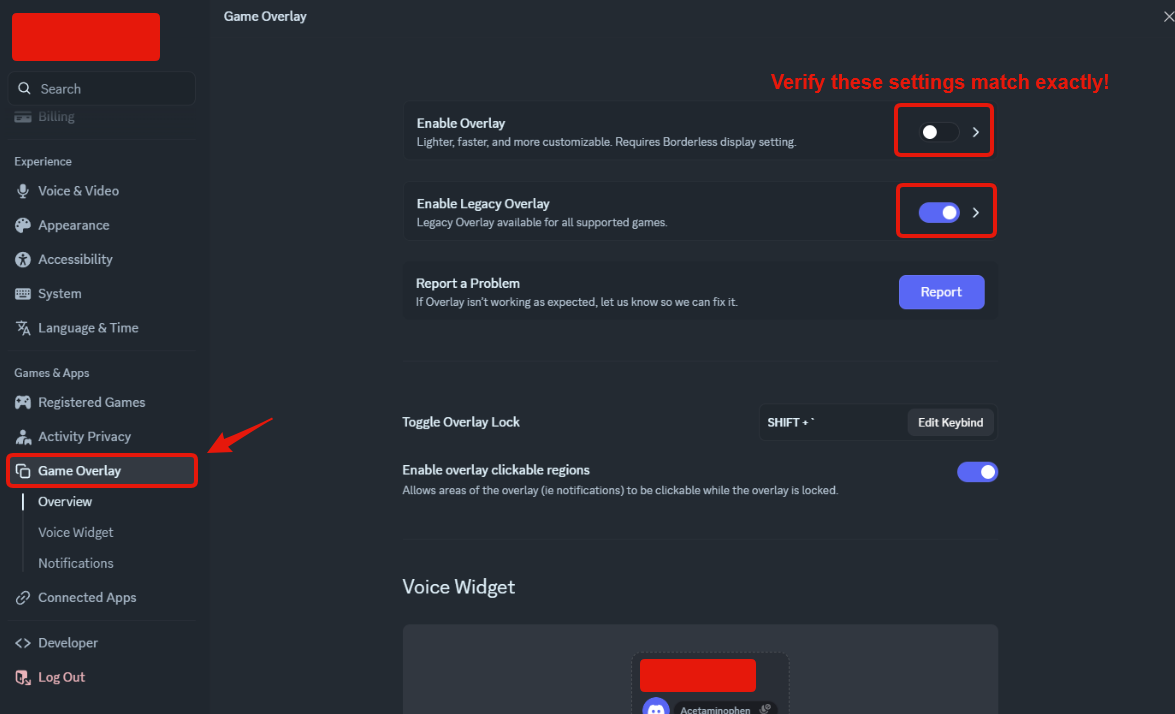
- Open Discord's User Settings using the cog icon shown below.

- Open Game Overlay. Match the screenshot: regular Enable Overlay is off and Enable Legacy Overlay is on.
- With the game running, confirm its game-specific overlay toggle is also enabled. The supplier's screenshot illustrates this with a detected game; check your own game's row.
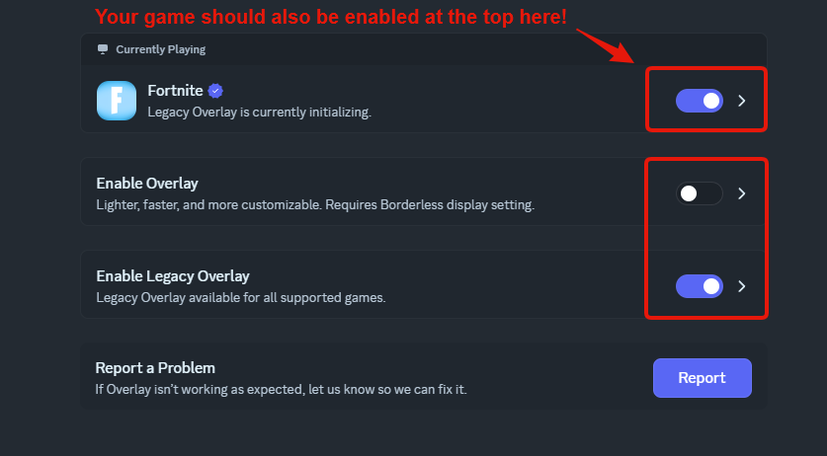
- Return to the game and allow a short time for the menu to appear.